macSVG version history
10 releases tracked, newest first.
v1.2.0
Jul 17, 2022- Added support for Apple Silicon M1/M2 processors.
0 downloads
v1.1.7
May 12, 2020**macSVG is a MIT-licensed open-source macOS app for designing HTML5 SVG 1.1 (Scalable Vector Graphics) art and animation.**
macSVG can produce dynamic, high-quality graphics and animation for HTML5 web views that work on most major desktop and mobile platforms, including iOS, Android, macOS, Microsoft Windows and Linux.
macSVG uses the standard macOS WebKit framework for interactive editing and rendering of SVG documents, in addition to several Cocoa plug-in bundles for editing SVG elements and attributes.
The latest release of macSVG, built as a code-signed and notarized macOS application, is available for download at https://github.com/dsward2/macSVG/releases
**See the macSVG website for more documentation and release notes - http://macsvg.org/**
## macSVG v1.1.7 Release Notes - May 12, 2020
This release of macSVG 1.1.7 contains several bug fixes, notably with the copy, paste and drag commands - and improves editing for SVG paths with relative coordinates. Some improvements were made for editing animation with keyTimes/keySplines/keyPoints for the animate, animateMotion and animateTransform elements. The built-in HTTP server was migrated to use GCDWebServer.
0 downloads
v1.1.6
Dec 10, 2019**macSVG is a MIT-licensed open-source macOS app for designing HTML5 SVG 1.1 (Scalable Vector Graphics) art and animation.**
macSVG can produce dynamic, high-quality graphics and animation for HTML5 web views that work on most major desktop and mobile platforms, including iOS, Android, macOS, Microsoft Windows and Linux.
macSVG uses the standard macOS WebKit framework for interactive editing and rendering of SVG documents, in addition to several Cocoa plug-in bundles for editing SVG elements and attributes.
The latest release of macSVG, built as an Apple ID-signed application, is available for download at https://github.com/dsward2/macSVG/releases
**See the macSVG website for more documentation and release notes - http://macsvg.org/**
## macSVG v1.1.6 Release Notes - December 9, 2019
This release of macSVG contains several bug fixes and a couple of new features.
The tool panel now contains a Share button. It can be used with AirDrop to quickly open the current SVG document on an iPhone, iPad or another Mac.
The user interface for managing animation elements has been improved for setting the keyTimes, keySplines and keyPoints attributes. This change makes it
0 downloads
v1.1.5
Feb 2, 2019**macSVG is a MIT-licensed open-source macOS app for designing HTML5 SVG 1.1 (Scalable Vector Graphics) art and animation.**
macSVG can produce dynamic, high-quality graphics and animation for HTML5 web views that work on most major desktop and mobile platforms, including iOS, Android, macOS, Microsoft Windows and Linux.
macSVG uses the standard macOS WebKit framework for interactive editing and rendering of SVG documents, in addition to several Cocoa plug-in bundles for editing SVG elements and attributes.
The latest release of macSVG, built as an Apple ID-signed application, is available for download at https://github.com/dsward2/macSVG/releases
**See the macSVG website for more documentation and release notes - http://macsvg.org/**
## macSVG v1.1.5 Release Notes - February 1, 2018
MacSVG v1.1.5 provides a temporary fix for the application to work in macOS Mojave Dark Mode. For now, the app will "opt-out" of Dark Mode, and render views as a Light Mode application. The next release will adjust the views to provide a proper Dark Mode user interface.
## macSVG v1.1.5 Installation
Download "macSVG-v1.1.5.zip" from the "Assets" section above, and decompress t
0 downloads
v1.1.4
May 9, 2018**macSVG is a MIT-licensed open-source macOS app for designing HTML5 SVG 1.1 (Scalable Vector Graphics) art and animation.**
macSVG can produce dynamic, high-quality graphics and animation for HTML5 web views that work on most major desktop and mobile platforms, including iOS, Android, macOS, Microsoft Windows and Linux.
macSVG uses the standard macOS WebKit framework for interactive editing and rendering of SVG documents, in addition to several Cocoa plug-in bundles for editing SVG elements and attributes.
The latest release of macSVG, built as an Apple ID-signed application, is available for download at https://github.com/dsward2/macSVG/releases
**See the macSVG website for more documentation and release notes - http://macsvg.org/**
## macSVG v1.1.4 Release Notes - May 8, 2018
MacSVG v1.1.4 features several bug fixes, mostly for the <animateTransform>, <path> and <image> elements, and the user interface for those elements.
In the Image Element Editor, the image box labeled "Drag image or SVG into box" now works as described.
In previous releases, the Image and Text tools remained the active tool after clicking in the SVG web view.
Fix
0 downloads
v1.1.3
May 9, 2018**A bug was found after this release was issued. A new release will be uploaded soon.**
**macSVG is a MIT-licensed open-source macOS app for designing HTML5 SVG 1.1 (Scalable Vector Graphics) art and animation.**
macSVG can produce dynamic, high-quality graphics and animation for HTML5 web views that work on most major desktop and mobile platforms, including iOS, Android, macOS, Microsoft Windows and Linux.
macSVG uses the standard macOS WebKit framework for interactive editing and rendering of SVG documents, in addition to several Cocoa plug-in bundles for editing SVG elements and attributes.
The latest release of macSVG, built as an Apple ID-signed application, is available for download at https://github.com/dsward2/macSVG/releases
**See the macSVG website for more documentation and release notes - http://macsvg.org/**
## macSVG v1.1.3 Release Notes - May 8, 2018
MacSVG v1.1.3 features several bug fixes, mostly for the <animateTransform>, <path> and <image> elements, and the user interface for those elements.
In the Image Element Editor, the image box labeled "Drag image or SVG into box" now works as described.
In previous releases,
0 downloads
v1.1.2
Nov 26, 2017**macSVG is a MIT-licensed open-source macOS app for designing HTML5 SVG 1.1 (Scalable Vector Graphics) art and animation.**
macSVG can produce dynamic, high-quality graphics and animation for HTML5 web views that work on most major desktop and mobile platforms, including iOS, Android, macOS, Microsoft Windows and Linux.
macSVG uses the standard macOS WebKit framework for interactive editing and rendering of SVG documents, in addition to several Cocoa plug-in bundles for editing SVG elements and attributes.
The latest release of macSVG, built as an Apple ID-signed application, is available for download at https://github.com/dsward2/macSVG/releases
**See the macSVG website for more documentation and release notes - http://macsvg.org/**
## macSVG v1.1.2 Release Notes - November 26, 2017
MacSVG v1.1.2 introduces a new plug-in called Element Info. This plug-in displays information about the currently selected element, and is especially helpful when drawing a new element or editing an existing one. The ElementInfoEditor shows these attribute values, depending on the element: x, y, width, height, cx, cy, r, rx and ry. The plug-in also show the current bounding box in th
0 downloads
v1.1.1
Nov 21, 2017**macSVG is a MIT-licensed open-source macOS app for designing HTML5 SVG 1.1 (Scalable Vector Graphics) art and animation.**
macSVG can produce dynamic, high-quality graphics and animation for HTML5 web views that work on most major desktop and mobile platforms, including iOS, Android, macOS, Microsoft Windows and Linux.
macSVG uses the standard macOS WebKit framework for interactive editing and rendering of SVG documents, in addition to several Cocoa plug-in bundles for editing SVG elements and attributes.
The latest release of macSVG, built as an Apple ID-signed application, is available for download at https://github.com/dsward2/macSVG/releases
**See the macSVG website for more documentation and release notes - http://macsvg.org/**
## macSVG v1.1.1 Release Notes - November 20, 2017
MacSVG v1.1.1 features improvements to the SVG web view rulers, the XML outline view, and drag-and-drop functions.
The new web view rulers now display numerical values at the major marks. The rulers will scale and translate to match the web view zoom factor and the scroll bar knobs.
The XML outline view was converted from cell-based to view-based, and the layout and fonts were
0 downloads
v1.1.0
Oct 25, 2017**macSVG is a MIT-licensed open-source macOS app for designing HTML5 SVG 1.1 (Scalable Vector Graphics) art and animation.**
macSVG can produce dynamic, high-quality graphics and animation for HTML5 web views that work on most major desktop and mobile platforms, including iOS, Android, macOS, Microsoft Windows and Linux.
macSVG uses the standard macOS WebKit framework for interactive editing and rendering of SVG documents, in addition to several Cocoa plug-in bundles for editing SVG elements and attributes.
The latest release of macSVG, built as an Apple ID-signed application, is available for download at https://github.com/dsward2/macSVG/releases
**See the macSVG website for more documentation and release notes - http://macsvg.org/**
## macSVG Release Notes
macSVG v1.1 - October 24, 2017
Several improvements and bug fixes were made for using the "transform" attribute for translate, scale, rotate, skewX and skewY operations. The interactive controls in the web view now work better with nested transformations using <g> group elements. Although a transform attribute can contain multiple operations, the controls may work better if the transform operations
0 downloads
1.0.1
Apr 4, 2017# macSVG 1.0.1 Release
## THIS VERSION IS OUTDATED. Please check the top of this page for the latest version - [https://github.com/dsward2/macSVG/releases](https://github.com/dsward2/macSVG/releases)
<img src="https://cdn.rawgit.com/dsward2/macSVG/7cf2b09884673e1bb65a0a9ab5df184741bb7c65/README_images/macsvg-logo-animation.svg" width="660" height="105">
**macSVG is a MIT-licensed open-source macOS app for designing HTML5 SVG 1.1 (Scalable Vector Graphics) art and animation.**
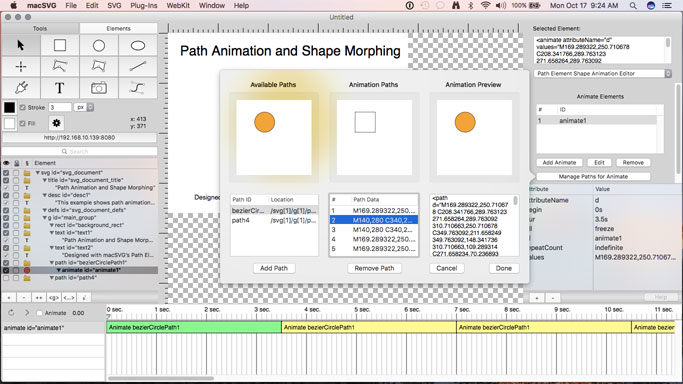
macSVG can produce dynamic, high-quality graphics and animation for HTML5 web views that work on most major desktop and mobile platforms, including iOS, Android, macOS, Microsoft Windows and Linux.
macSVG uses the standard macOS WebKit framework for interactive editing and rendering of SVG documents, in addition to several Cocoa plug-in bundles for editing SVG elements and attributes.
An Apple ID-signed application is available for download at http://macsvg.org/download/
**See the macSVG website for more documentation and release notes - http://macsvg.org/**
# Examples:
1 download