rustypaste version history
10 releases tracked, newest first.
v0.17.0
May 14, 2026- Added server hardening options and MIME type overrides for security
- Added filename override support for remote URL uploads
- Added option to generate random URLs without file extensions
- Added new third-party clients and OpenRC service file
2 downloads
v0.16.1
Mar 21, 2025### Added
- Add unofficial clients to the documentation
1. Droidypaste
Yes, you heard it right! `rustypaste` now has an Android client!
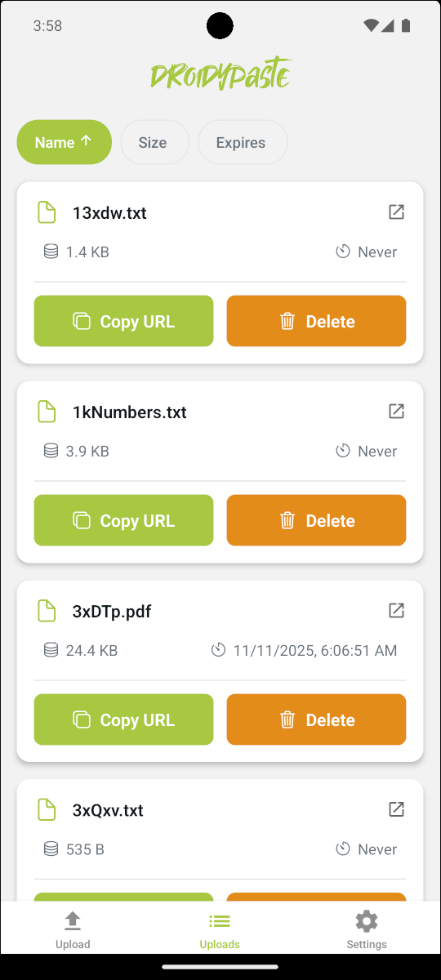
GitHub: <https://github.com/rukh-debug/droidypaste>
2. Ferripaste
An alternative Rustypaste client
GitHub: <https://github.com/dbohdan/ferripaste>
3. Rustypaste-GUI
A script for a mininal GUI client for `rustypaste` (powered by zenity)
GitHub: <https://gist.github.com/rukh-debug/cc42900f86e39cacef6f7a6ba77ebf58>
### Changed
- Use fully locked system accounts on systemd257
- Bump to Rust 2024 edition
- Update dependencies
### New Contributors
- @rukh-debug made their first contribution in [#407](https://github.com/orhun/rustypaste/pull/407)
2 downloads
v0.16.0
Dec 11, 2024### Added
- Support `max_upload_dir_size` by @Narayanbhat166
Now you can configure the server to limit the total size of the uploaded files as follows:
```toml
[server]
max_upload_dir_size = "100G"
```
This would help with e.g. public instances in terms of avoiding a storage attack where a single user uploads a bunch of big/small files.
- Add support for multiple auth tokens via env vars by @nydragon in [#339](https://github.com/orhun/rustypaste/pull/339)
In addition to `[server].auth_tokens` and `[server].delete_tokens` in the configuration file, it has been made possible to set multiple tokens for authentication and deletion via their respective environment variables.
- `AUTH_TOKENS_FILE`: Points to a file containing a list of tokens for authentication, one per line.
- `DELETE_TOKENS_FILE`: Points to a file containing a list of tokens for deletion, one per line.
For example:
`export AUTH_TOKENS_FILE=./auth_file`
and `auth_file` contains:
```plaintext
bread
brioche
baguette
naan
```
### Changed
- Allow shortening URLs with a filename by @Vaelatern in [#373](https://github.com/orhun/rustypaste/pull/373)
This enable naming shortened
2 downloads
v0.15.1
Jul 29, 2024### Added
- Include file creation date in the file list (`creation_date_utc`)
```sh
$ curl "http://<server_address>/list" | jq .
[
{
"file_name": "immense-goose.txt",
"file_size": 416,
"creation_date_utc": "2024-06-12 19:21:56",
"expires_at_utc": null
}
]
```
- Enable Docker ARM64 builds
- Add @tessus as a maintainer
### Removed
- Remove public instance link and blog post from README.md
### Fixed
- Fix uploading reports to codecov
## New Contributors
* @viktaur made their first contribution in https://github.com/orhun/rustypaste/pull/294
**Full Changelog**: https://github.com/orhun/rustypaste/compare/v0.15.0...v0.15.1
2 downloads
v0.15.0
Mar 27, 2024### Added
- Allow to override filename when using `random_url` by @tessus in [#233](https://github.com/orhun/rustypaste/pull/233)
Now you can use the `filename` header to override the name of the uploaded file.
For example:
```sh
curl -F "file=@x.txt" -H "filename:override.txt" http://localhost:8000
```
Even if `random_url` is set, the filename will be override.txt
[`rustypaste-cli`](https://github.com/orhun/rustypaste-cli) also has a new argument for overriding the file name:
```sh
rpaste -n filename-on-server.txt awesome.txt
```
- Use more specific HTTP status codes by @tessus in [#262](https://github.com/orhun/rustypaste/pull/262)
`rustypaste` now returns more appropriate status codes in the following 2 cases (instead of a generic 500 code):
- If the mime type is on the blacklist: `UnsupportedMediaType` (415)
- If the file already exists: `Conflict` (409)
### Changed
- Do path joins more safely by @RealOrangeOne in [#247](https://github.com/orhun/rustypaste/pull/247)
- Gracefully exit when there is no config file found by @orhun
- Switch to cargo-llvm-cov for code coverage by @orhun in [#260](https://github.com/orhun/rustypaste/pull/260
2 downloads
v0.14.4
Dec 20, 2023### Removed
- Remove excessive warning messages when auth tokens are not found (#210) (Thanks @tessus!)
2 downloads
v0.14.3
Dec 12, 2023### Changed
- Return `404` for not exposed endpoints instead of `403`
- Disallow blank `delete_tokens` and `auth_tokens`
- Bump dependencies
Thanks to @DDtKey for contributing to this release and creating [`protect-endpoints`](https://github.com/DDtKey/protect-endpoints). 💖
2 downloads
v0.14.2
Dec 5, 2023### Added
- Add installation instructions for FreeBSD (#177)
- Add auth token handling to HTML form example (#183)
- Add release instructions
### Changed
- Bump Shuttle to `0.34.1`
- Bump dependencies
2 downloads
v0.14.1
Nov 2, 2023### Changed
- Switch to `tracing` for logging (#163)
- Bump Shuttle to `0.31.0`
- Bump dependencies
2 downloads
v0.14.0
Sep 5, 2023### Added
- Add delete endpoint (#136)
Now you can delete files from the server with sending a [`DELETE`](https://developer.mozilla.org/en-US/docs/Web/HTTP/Methods/DELETE) request. To enable this, set the `delete_tokens` array in the configuration file or use the `DELETE_TOKEN` environment variable.
```toml
[server]
delete_tokens = [ "may_the_force_be_with_you" ]
```
And then you can send a `DELETE` request as follows:
```sh
$ curl -H "Authorization: may_the_force_be_with_you" -X DELETE "<server_address>/file.txt"
file deleted
```
You can also use [`rpaste`](https://github.com/orhun/rustypaste-cli#delete-files-from-server) (the command line tool) to delete files:
```sh
$ rpaste -d awesome.UA86.txt
```
### Changed
- Update crates and rustls deps (#135)
- Bump Shuttle to `0.25.0`
2 downloads