vhs version history
10 releases tracked, newest first.
v0.11.0
Mar 10, 2026- Added viewport scroll commands (`ScrollUp` and `ScrollDown`)
- Added support for `Ctrl+<arrow>` keys
- Fixed Docker-related issues (font and env variables)
- Fixed lint issues and improved CI configurations
20 downloads
v0.10.0
Jun 17, 2025## Changelog
### New Features
* d9fd05fa446f74a524b01d85a46f7e1861b1a50d: feat: support additional alt/ctrl/shift special characters (#582) (@raphamorim)
### Bug fixes
* 5fd3e351f336734f73aa4dd53669f7727897cb5a: fix(ci): use meta lint workflow (@aymanbagabas)
* b461e7bc63c36319d3eca69d577deca93c874bf3: fix(record): propagate env of vhs process to record terminal (#572) (@tr3mor)
* ed7c8a9282825cd3eeb71a1d2c3091ffe031d4c4: fix(record): set PAGEX to PAGE_X for proper capitalization (#570) (@bashbunni)
* ab03c35a9c92a614690a640b3f50c43ed1366db3: fix: lint (@caarlos0)
* 710bb769af94d844ffdc3c8b737a6775813fc0a4: fix: lint (#637) (@caarlos0)
* ce7286f30c602ebdea4a8fc773b0b5012aa16608: fix: lint issues (@caarlos0)
* fd38bed9b5f24302ed648f934a5a8402b87095c1: fix: source nested tapes (#567) (@rsteube)
* 25d888f2c3cf848e470ce251e2c7718cdbed9092: fix: source not respecting arguments of sourced commands (#604) (@caarlos0)
* 2c7733e76ae7a5158518e5c30cb3a715ca8c27e3: fix: sync golangci-lint config (#573) (@github-actions[bot])
### Dependency updates
* aeecc2fea6029ca0f2a2612708d151b1c381332d: fix(deps): glamour (@caarlos0)
### Documentation updates
* e9647e868367e3641887eb06c0f99714182ba065: doc
20 downloads
v0.9.0
Jan 15, 2025# VHS v0.9.0
## Hurry up and `Wait`
This release introduces the `Wait` keyword:
```tape
Output wait.gif
Require gum
Type "./slow.sh"
Enter
Wait+Screen@10s /Hello/
Type "echo Lets Go!"
Enter
Sleep 1
```
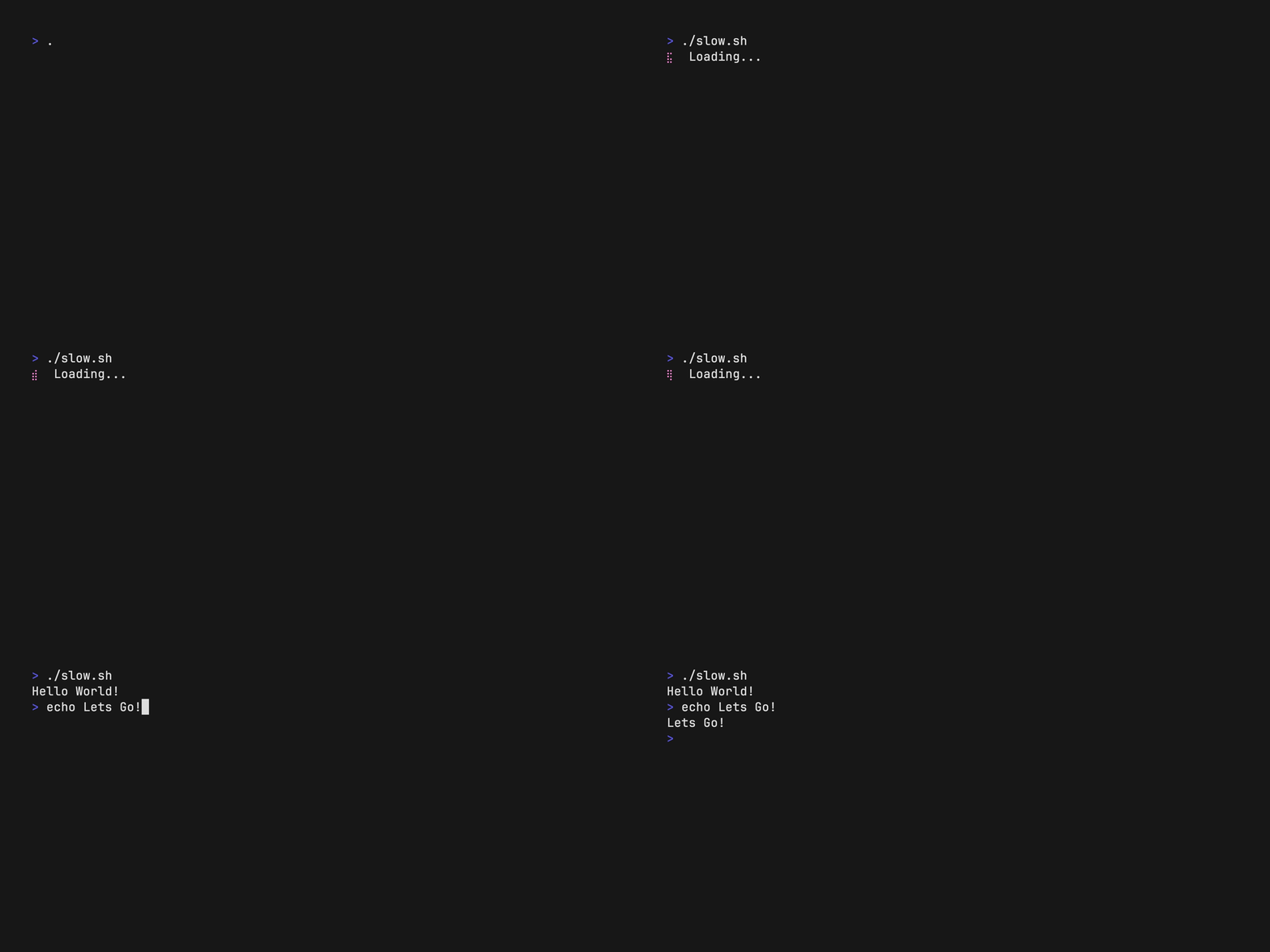
This allows you to remove all the random `Sleep`s in your tape files!
You can now wait for specific conditions instead. This means more control while simplifying tape file creation.
## More shells
There's also support for `xonsh` and `osh`, so you can now use them in
your tapes as well:
```tape
Output examples/settings/set-shell-xonsh.gif
Set FontSize 38
Set Height 225
Set Shell xonsh
Sleep 1s
Type "I am using xonsh."
Sleep 2s
```

## Changelog
### New Features
* 9624cdad81eb73f050415b44bfc097fc371ba566: feat: add Wait to wait for expected output (#257) (@mastercactapus)
* 5ddc8628a74ef6a645e0a44c6c7bb03df6873573: feat: added osh (#564) (@rsteube)
* 16ec55b02b9934ee9e8e83d877ed7b9c1fd46d32: feat: added xonsh (#563) (@rsteube)
* 92db33b8091b040101ab060bf736f97e2bc7835d: feat: don't create 'out.gi
20 downloads
v0.8.0
Sep 6, 2024# Environmental friendliness
Ever want to alter the environment in your `.tape` files? Now you can with the `ENV` directive:
```vhs
Env HELLO "WORLD"
Type "echo $HELLO"
Enter
Sleep 1s
```
<img src="https://media.githubusercontent.com/media/charmbracelet/vhs/0bec1f5823ed2656b912edab1dd3bdc896a8df79/examples/env/env.gif" width="300">
## Bonus: change the prompt
Also thanks to @Delta456, you can now change the prompt by setting `PROMPT` in the environment:
```vhs
Env PROMPT "〉"
```
For details see: https://github.com/charmbracelet/vhs/pull/469.
## Changelog
### New!
* 1fc80027a1bd05737965d7a5026efbd67d161226: cmd: add support for `ENV` command (#469) (@Delta456)
* d56384f273b5f721566a25453196599009230fd5: set VHS_RECORD="true"while running (#478)(@rockorager)
* f6a3e2930435c1479faa5ef9cbaa79f5cc603db3: sign & notarize macOS binaries (#494) (@caarlos0)
### Fixed
* 859d89d3d5a840f7bb9a0b191a7fbe73a8e61556: fix duplicate if statement (@maaslalani)
* ed69431b5a46d4ba1c6c1a4f08e8d1dac8ffbc03: hide vhs publish info when exiting with tape errors (#466) (@Delta456)
* dd6b6b8e076ab645b870d650316cb0d47d7d3aa2: fix ShiftLeft when using Shift+Tab (#475
20 downloads
v0.7.2
Apr 15, 2024## Changelog
### Bug fixes
* 9c7172e04d719d6045c057a3e9fb5db05474295d: Fix `vhs serve` mode (#448) (@t-chab)
* 03cb81b5c310430d44de494db1094bf6555d7363: Update `log` dependency (@caarlos0)
### Other work
* 99506788042c267f0053e05aa8dfa4c5d2dc305b: Fix app crash when there is repeated `SLEEP` at the end of the "lines" slice (#446) (@alaingilbert)
* 2a1d3038af93dabf5e45bb0259653d684267bc91: Refactor Lexer, Parser, Token into packages (#427) (@maaslalani)
---
<details>
<summary>Verifying the artifacts</summary>
First, download the [`checksums.txt` file](https://github.com/charmbracelet/vhs/releases/download/0.7.2/checksums.txt), for example, with `wget`:
```bash
wget 'https://github.com/charmbracelet/vhs/releases/download/v0.7.2/checksums.txt'
```
Then, verify it using [`cosign`](https://github.com/sigstore/cosign):
```bash
cosign verify-blob \
--certificate-identity 'https://github.com/charmbracelet/meta/.github/workflows/goreleaser.yml@refs/heads/main' \
--certificate-oidc-issuer 'https://token.actions.githubusercontent.com' \
--cert 'https://github.com/charmbracelet/vhs/releases/download/v0.7.2/checksums.txt.pem' \
--signature 'https://gith
20 downloads
v0.7.1
Dec 12, 2023# Freeze Frame ❄️ 📸
With VHS `v0.7.0`, you can capture the any moment during tape execution. Just add in `Screenshot <filename>.png` to your tapes:
```elixir
Type ls
Enter
# Capture the output of 'ls'
Screenshot files.png
# Now, continue as you normally would
Type 'cd ..'
Enter
```
Your tape outputs a GIF, and outputs a file named `files.png`.
### Copy-Paste Functionality!
VHS can now talk to your system clipboard. Please keep this in mind when executing tapes from unknown sources.
> [!WARNING]
> You should never `curl` pipe into VHS, it's similar to executing a bash script on your computer!
```elixir
Copy "https://github.com/charmbracelet/huh"
Type 'curl '
Paste
Enter
```
## New Modifiers + Keys Alert!
VHS `v0.7.0` has some new additions: introducing the top level `Shift+` modifier and the `Insert` + `Delete` keys!
```elixir
# Shift things up a bit!
Shift+A
Shift+Tab
Shift+Enter
# Insert and delete to your hearts desire:
Insert
Delete
```
---
<a href="https://charm.sh/"><img alt="The Charm logo" src="https://stuff.charm.sh/charm-badge.jpg" width="400"></a>
Thoughts? Questions? We love hearing from you. Feel
20 downloads
v0.7.0
Dec 12, 2023# Freeze Frame ❄️ 📸
With VHS `v0.7.0`, you can capture the any moment during tape execution. Just add in `Screenshot <filename>.png` to your tapes:
```elixir
Type ls
Enter
# Capture the output of 'ls'
Screenshot files.png
# Now, continue as you normally would
Type 'cd ..'
Enter
```
Your tape outputs a GIF, and outputs a file named `files.png`.
### Copy-Paste Functionality!
VHS can now talk to your system clipboard. Please keep this in mind when executing tapes from unknown sources.
> [!WARNING]
> You should never `curl` pipe into VHS, it's similar to executing a bash script on your computer!
```elixir
Copy "https://github.com/charmbracelet/huh"
Type 'curl '
Paste
Enter
```
## New Modifiers + Keys Alert!
VHS `v0.7.0` has some new additions: introducing the top level `Shift+` modifier and the `Insert` + `Delete` keys!
```elixir
# Shift things up a bit!
Shift+A
Shift+Tab
Shift+Enter
# Insert and delete to your hearts desire:
Insert
Delete
```
---
<a href="https://charm.sh/"><img alt="The Charm logo" src="https://stuff.charm.sh/charm-badge.jpg" width="400"></a>
Thoughts? Questions? We love hearing from you. Feel
0 downloads
v0.6.0
Jul 20, 2023# Font Fallbacks, New modifiers, CursorBlink
This release of VHS features 3 new additions as well as several small bug fixes to make sure everything runs smoothly.
### New Features
* bd35699dd58f0fea9b97e6822a48294ae42e2346: Apple Symbols font fallback for braille characters (@maaslalani)
* 4dd9a81e0f517b0eec55a7451ff339788b51a602: `Alt` + `Shift` modifiers (#316) (@elmarsan)
* 46cf42f4fd867ceb7d47fdf5f76df7f2336c4f1f: Cursor Blink settings (#324) (@tr3mor)
### Font Fallback
VHS now falls back to using Apple Symbols on MacOS to render braille characters without empty dots.
### `Alt` + `Shift` modifiers
```
Ctrl[+Alt][+Shift]+<char>
```
`Ctrl` commands can now be modified with `Alt` or `Shift` characters to perform different key press combinations.
### Cursor Blink
```
Set CursorBlink false
```
To avoid cursor blinking, simply use the `CursorBlink` setting (defaults to `true`).
* * *
<a href="https://charm.sh/"><img alt="The Charm logo" src="https://stuff.charm.sh/charm-badge.jpg" width="400"></a>
Thoughts? Questions? We love hearing from you. Feel free to reach out on [Twitter](https://twitter.com/charmcli), [The Fediverse](https://mast
20 downloads
v0.5.0
May 17, 2023# VHS Sorcery 🪄
This release of VHS includes a brand new `Source` command:
You can now include (`Source`) other tape files into other tape files to reuse collections of commands that you find yourself repeating. This allows you to build tape modules and compose parent tape files.
To get started, let's create two tape files:
```bash
touch source.tape
touch demo.tape
```
In `source.tape` place any commands you repeat often
```elixir
Type "I'm being summoned."
Sleep 500ms
Enter
```
Then, in `demo.tape`, you can `Source source.tape` which will execute all the commands found in the sourced tape file.
```elixir
Output out.gif
Set Height 1000
Source source.tape # this will execute all commands in ./source.tape
Type "That's all folks"
Enter
```
When you run `vhs demo.tape` it will perform all the commands within the tape file and when it reaches the `Source` invocation it will execute all the commands in `type.tape`:
### Other features
* feat: `Alt+Enter` by @maaslalani in https://github.com/charmbracelet/vhs/pull/305
### Bug Fixes
This release of VHS fixes a bug that caused incorrect background rendering (https://github.com/charmbracelet/
28 downloads
v0.4.0
Apr 5, 2023# Terminal Decorations 🎨
The latest version of VHS includes a ton of new settings for you to play around with! These settings allow you to decorate your GIFs and make them look even more like terminal emulators.
This release also includes a new `Alt` command, a `--quiet` flag for silent outputs, and bug fixes when starting up different shells.
<img src="https://user-images.githubusercontent.com/42545625/230165947-ed9429d9-6171-4beb-835b-81d7d412bee8.gif" width="800" />
## New Settings
- `Margin`: Adds a margin around the outside of your terminal, while `Padding` allows you to add padding inside the terminal.
- `MarginFill`: Adds a background color to the outside of the terminal. To change the background color of the terminal itself, use `Set Theme` and specify the background.
- `WindowBar`: Adds a terminal window frame/bar to the top of the GIF. This value can be one of `Colorful`, `ColorfulRight`, `Rings`, or `RingsRight`.
- `WindowBarSize`: Sets how the `WindowBar` should appear.
- `BorderRadius`: Sets the border radius of the terminal.
```elixir
Set Margin 80
Set MarginFill "#674EFF"
Set WindowBar "Colorful"
Set WindowBarSize 40
Set BorderRadius 8
``
20 downloads