WindTerm version history
10 releases tracked, newest first.
2.7.0
Mar 11, 2025- Added Tmux Integration for seamless tmux session, window, and pane management.
- Introduced Agent Forwarding for enhanced SSH key security.
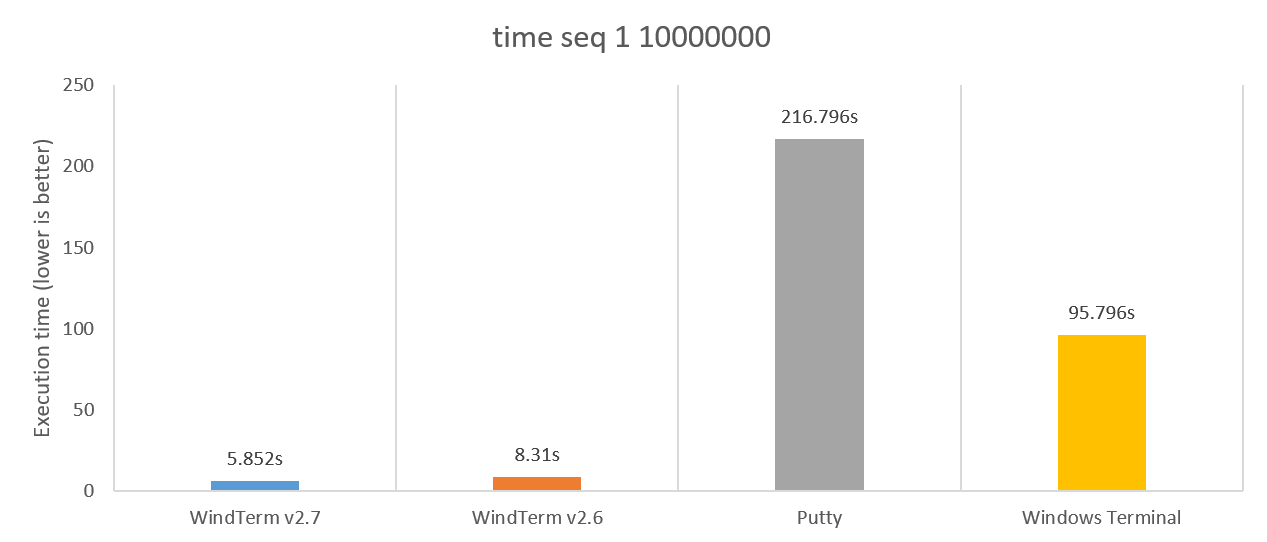
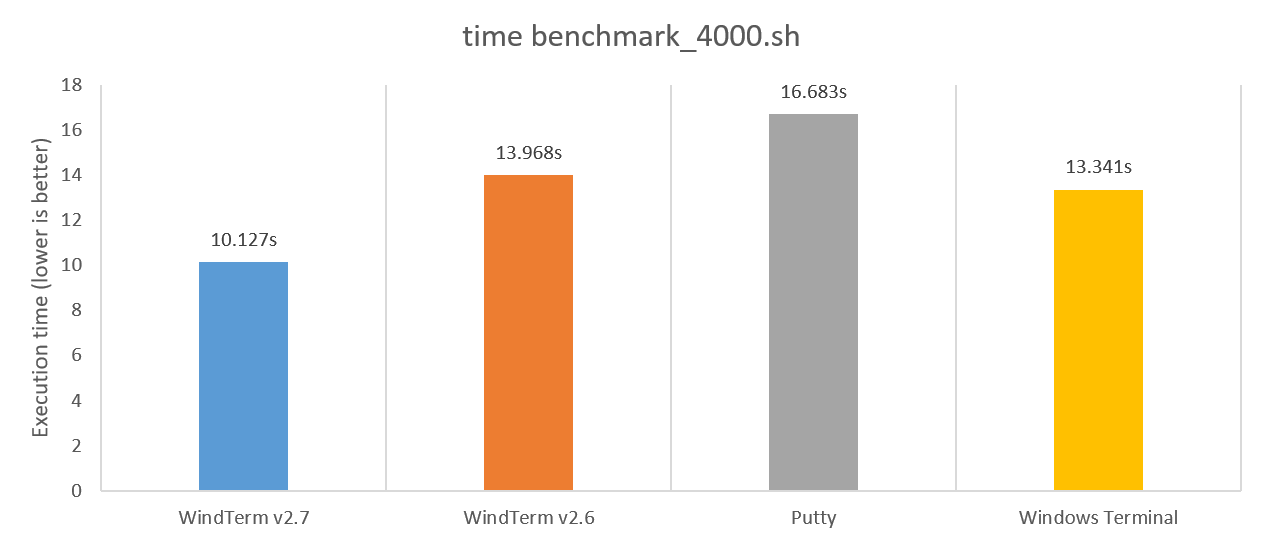
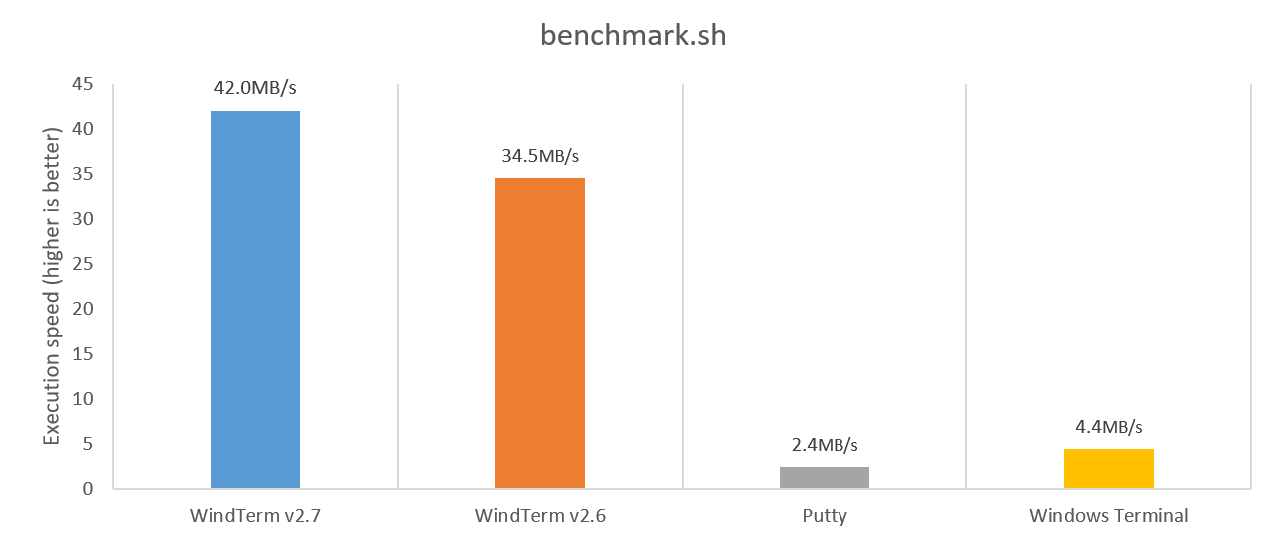
- Improved terminal performance by 20%~30% compared to version 2.6.1.
- Increased SFTP transfer speeds by 20%~40% for faster file transfers.
4 downloads
2.7-prerelease-3
Pre-releaseFeb 10, 2025# Usage:
### Windows
| Version | Architecture | Operating Systems |
| --------- | -------------- | --------------------- |
| WindTerm_2.7.0_Prerelease_3_Windows_Portable_x86_64 | x86_64 | Windows 7, Windows 8, Windows 10, Windows 11 |
<details>
<summary><strong>Installation</strong></summary>
- Download portable packages and uncompress it.
> **MacOS**
> Please open dmg file and drag WindTerm.app to the `Applications` folder.
> **Linux**
Please use the following command to run the WindTerm after downloading.
``` shell
tar -xzvf WindTerm_2.7.0_Linux_Portable_x86_64.tar.gz && cd ./WindTerm_2.7.0 && chmod +x ./WindTerm && ./WindTerm
```
- Scoop
> scoop bucket add extras
> scoop install windterm
- Chocolatey
> choco install windterm
</details>
### Upgrade
<details>
<summary><strong>Versions before Version 2.4.0</strong></summary>
1. Start `WindTerm` and select the `profiles directory` and **quit**.
2. Replace the new `.wind/profiles` folder with the old `profiles` folder.
3. Restart `WindTerm` and all the sessions and configuration will be restored.
</details>
<details>
<summary><strong>Versions after Version 2.4.0</strong></summa
1 download
2.7-prerelease-2
Pre-releaseJan 12, 2025# Spotlight
## Tmux Integration (tmux -CC)
`Tmux Integration` making it easier and more efficient for you to work with `tmux`. With this integration, tmux sessions, windows, and panes are mapped and displayed in the native user interface. All commonly used tmux features are fully supported, creating a near-perfect fusion between `tmux` and `WindTerm`.
`Tmux Integration` supports:
- [Tmux Integration](https://kingtoolbox.github.io/2025/01/05/tmux-integration/)
- [Tmux Integration / Common Keyboard Shortcuts](https://kingtoolbox.github.io/2025/01/05/tmux_common-keyboard-shortcuts/)
- [Tmux Integration / Attach Session](https://kingtoolbox.github.io/2025/01/05/tmux_attach-session/)
- [Tmux Integration / Detach Session](https://kingtoolbox.github.io/2025/01/05/tmux_detach-session/)
- [Tmux Integration / Execute Tmux Command](https://kingtoolbox.github.io/2025/01/05/tmux_execute-tmux-command/)
- [Tmux Integration / Kill Pane](https://kingtoolbox.github.io/2025/01/05/tmux_kill-pane/)
- [Tmux Integration / Kill Window](https://kingtoolbox.github.io/2025/01/05/tmux_kill-window/)
- [Tmux Integration / Kill Session](https://kingtoolbox.github.io/2025/01/05/tmux_kill-sessio
1 download
2.7-prerelease
Pre-releaseApr 3, 2024# Spotlight
## Agent forwarding
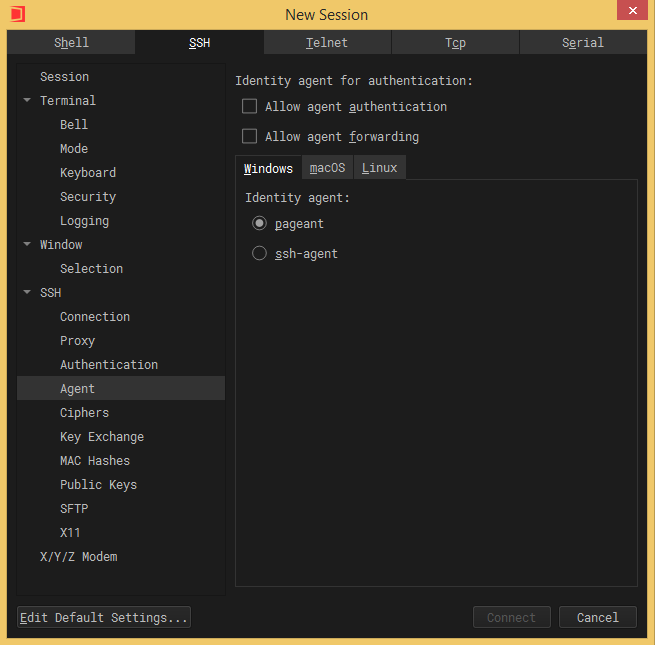
#### `Agent Forwarding` is a powerful feature that enhances remote access security by allowing the use of private SSH keys locally without exposing them to remote servers.
# Performance
## Terminal
#### The meticulous refinement of the code, coupled with the carefully optimized framework, further enhances the performance by `20%~30%` compared to version `2.6.1`. All operations respond more promptly and smoothly.
## Sftp Transfer
#### Although version `2.6.1` was already incredibly fast, version `2.7.0` takes it a step further by increasing the transfer speed by another `20%~40%`. Whether you're transferring large files or a large number of small files, the new version can save you even more time!

`Rainbow Brackets` supports assigning a unique color to each pair of opening and closing brackets to make it very easy to identify them and their scope.
## Highlight Text
- [Intro Video: Highlight Text](https://kingtoolbox.github.io/tags/highlight-text/)
`Highlight Text` supports marking text with specified `font color`, `background color`, `line type`, and `line color`, which makes it very convenient to highlight the output text that needs attention.
## Manage sessions
- [Intro Video: Manage Sessions](https://kingtoolbox.github.io/2023/11/15/manage-sessions/)
With the newly added features of `drag and drop` and `move to`, session management has become more convenient and easy.
## OneKey
- [Intro Video: OneKey](https://kingtoolbox.github.io/tags/onekey/)
`OneKey` enables automatic login by using the preset login settings. When a large number of servers share the same login settings, this feature can greatly facilitate their management. Especially when login settings change, it is easy to make all servers switch to the new login se
4 downloads
2.6-prerelease
Pre-releaseAug 22, 2022# Spotlight
## Manage sessions
- [Intro Video: Manage Sessions](https://kingtoolbox.github.io/2023/11/15/manage-sessions/)
#### With the newly added features of `drag and drop` and `move to`, session management has become more convenient and easy.
## OneKey
- [Intro Video: OneKey](https://kingtoolbox.github.io/tags/onekey/)
#### `OneKey` enables automatic login by using the preset login settings. When a large number of servers share the same login settings, this feature can greatly facilitate their management. Especially when login settings change, it is easy to make all servers switch to the new login settings by simply modifying the corresponding `OneKey`.
`OneKey` supports:
- [SSH OneKey](https://kingtoolbox.github.io/2023/06/07/onekey_ssh_onekey/)
- [Expect OneKey](https://kingtoolbox.github.io/2023/06/07/onekey_expect_onekey/)
## Highlight Text
- [Intro Video: Highlight Text](https://kingtoolbox.github.io/tags/highlight-text/)
#### `Highlight Text` supports marking text with specified `font color`, `background color`, `line type`, and `line color`, which makes it very convenient to highlight the output text that needs attention.
## Rainbow Bracke
3 downloads
2.5.0
Jul 24, 2022# Spotlight
## Auto Completion
- [Intro Video: Auto Completion](https://kingtoolbox.github.io/2022/05/18/auto_completion/)
- [Intro Video: Auto Completion / History Commands](https://kingtoolbox.github.io/2022/05/18/auto_completion_history_commands/)
- [Intro Video: Auto Completion / Quick Commands](https://kingtoolbox.github.io/2022/05/18/auto_completion_quick_commands/)
#### Auto completion suggests `commands`, `subcommands`, `command options`, `command parameters`, `history commands` and `quick commands` from the `QuickBar` that are currently available.
#### Auto completion will recommend the most suitable parameters or phrases based on historical input, which greatly increases text input speed, because you don't have to memorize a large number of commands and type every letter in a command.
Auto completion supports:
- Linux Shell commands.
- MacOS Shell commands.
- Windows Cmd commands.
- PowerShell commands.
- Commands of any command line program, such as `Git`
- Quick Commands from the `QuickBar`
# Usage:
### Windows
| Version | Architecture | Operating Systems |
| --------- | -------------- | --------------------- |
| WindTerm_2.5.0_Windows
4 downloads
2.5-prerelease
Pre-releaseMay 19, 2022# Spotlight
## Auto Completion
- [Intro Video: Auto Completion](https://kingtoolbox.github.io/2022/05/18/auto_completion/)
- [Intro Video: Auto Completion / History Commands](https://kingtoolbox.github.io/2022/05/18/auto_completion_history_commands/)
- [Intro Video: Auto Completion / Quick Commands](https://kingtoolbox.github.io/2022/05/18/auto_completion_quick_commands/)
#### Auto completion suggests `commands`, `subcommands`, `command options`, `command parameters`, `history commands` and `quick commands` from the `QuickBar` that are currently available.
#### Auto completion will recommend the most suitable parameters or phrases based on historical input, which greatly increases text input speed, because you don't have to memorize a large number of commands and type every letter in a command.
Auto completion supports:
- Linux Shell commands.
- MacOS Shell commands.
- Windows Cmd commands.
- PowerShell commands.
- Commands of any command line program, such as `Git`
- Quick Commands from the `QuickBar`
# Usage:
### Windows
| Version | Architecture | Operating Systems |
| --------- | -------------- | --------------------- |
| WindTerm_2.5.0_Prerele
1 download
2.4.0
Apr 18, 2022# Spotlight
## Dynamic memory compression
**No terminal or text editor has ever been able to dynamically compress document memory during use. But WindTerm does now!**
Now you only need **100MB** memory to output `100 million` lines of text for `seq 1 100000000` command, or even **1GB** memory to output `2 billion` lines of text for `seq 1 2000000000` command.
### Benchmark
- `None` Scheme **without** styling, folding, outlining etc., `Word Wrap` is disabled.
| Memory Usage(MB) | WindTerm 2.3.1 | WindTerm 2.4.0 Prerelease 2 | Compression |
|------|---|---|---|
| seq 1 10,000,000 | 95.7MB | **89MB** | 93% |
| seq 1 100,000,000 | 860.1MB | **100.7MB** | 11.7% |
| seq 1 2,000,000,000 | Out of memory | **770.8MB** | - |
- `Linux` Scheme **with** styling, folding, outlining etc., `Word Wrap` is disabled.
| Memory Usage(MB) | WindTerm 2.3.1 | WindTerm 2.4.0 Prerelease 2 | Compression |
|------|---|---|---|
| seq 1 10,000,000 | 212MB | **143.3MB** | 67.6% |
| seq 1 100,000,000 | 1990.2MB | **334.8MB** | 16.8% |
More performance data will be provided in the future, including comparisons with other `Terminals`.
## Free Type Mode [Intro Video](https://kingt
4 downloads
2.4-prerelease
Pre-releaseMar 20, 2022# Spotlight
## Dynamic memory compression
### No terminal or text editor has ever been able to dynamically compress document memory during use. But WindTerm does now! Now you only need `100m` memory to output `100 million` lines of text for `seq 1 100000000` command.
### Benchmark
- `None` Scheme **without** styling, folding, outlining etc., `Word Wrap` is disabled.
| Memory Usage(MB) | WindTerm 2.3.1 | WindTerm 2.4.0 Prerelease 2 | Compression |
|------|---|---|---|
| seq 1 10,000,000 | 95.7MB | **89MB** | 93% |
| seq 1 100,000,000 | 860.1MB | **100.7MB** | 11.7% |
- `Linux` Scheme **with** styling, folding, outlining etc., `Word Wrap` is disabled.
| Memory Usage(MB) | WindTerm 2.3.1 | WindTerm 2.4.0 Prerelease 2 | Compression |
|------|---|---|---|
| seq 1 10,000,000 | 212MB | **143.3MB** | 67.6% |
| seq 1 100,000,000 | 1990.2MB | **334.8MB** | 16.8% |
More performance data will be provided in the future, including comparisons with other `Terminals`.
## Free Type Mode [Intro Video](https://kingtoolbox.github.io/2022/04/12/free_type_mode/)
### Free type mode lets you using the mouse to quickly move the cursor, select text, and drag and drop text,
1 download